Get support for your application. Find resources, contact information, and step-by-step guides on uploading documents and your application details.
Average Wait Times
Average Wait Times for RGI Housing
| Unit Size |
Average Time On Waitlist* |
| Studio - Senior |
10 years |
| Studio |
12 years |
| 1-bedroom |
14 years |
| 2-bedroom |
12 years |
| 3+-bedroom |
15 years |
*Information is based on 2025 data
Uploading a Notice of Assessment
You will need to obtain the latest Notice of Assessment (NOA) from the Canada Revenue Agency (CRA) and upload it to your MyAccesstoHousingTO account.
Step 1: Download your NOA from the CRA
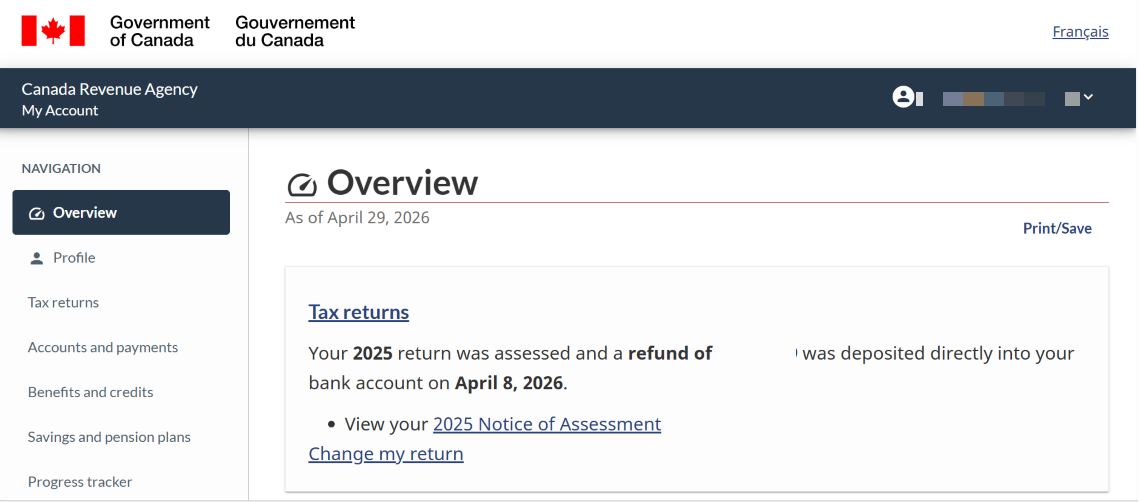
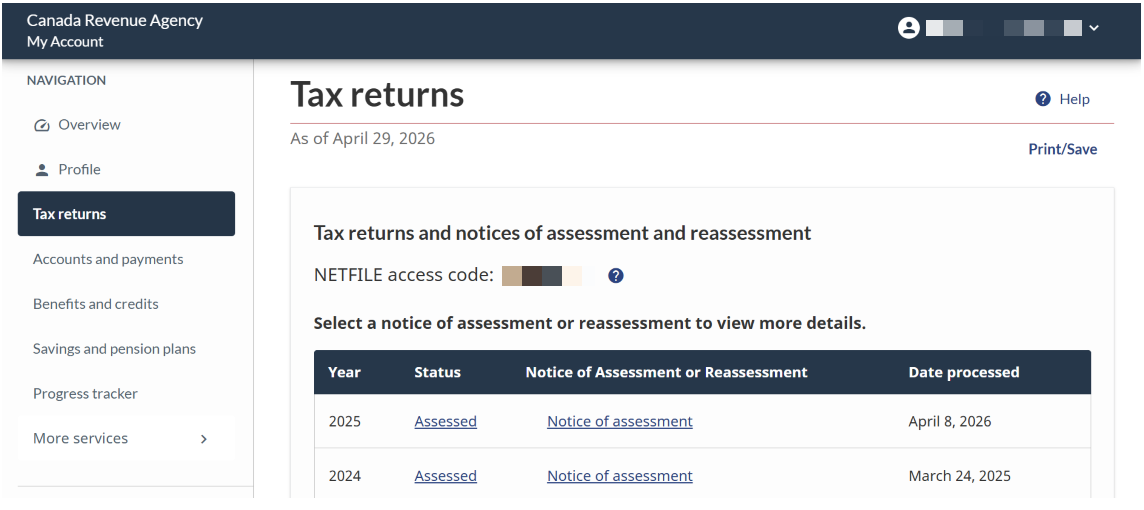
- Locate Tax Returns: On the main Overview page, click on the “Tax Returns” tab or section.
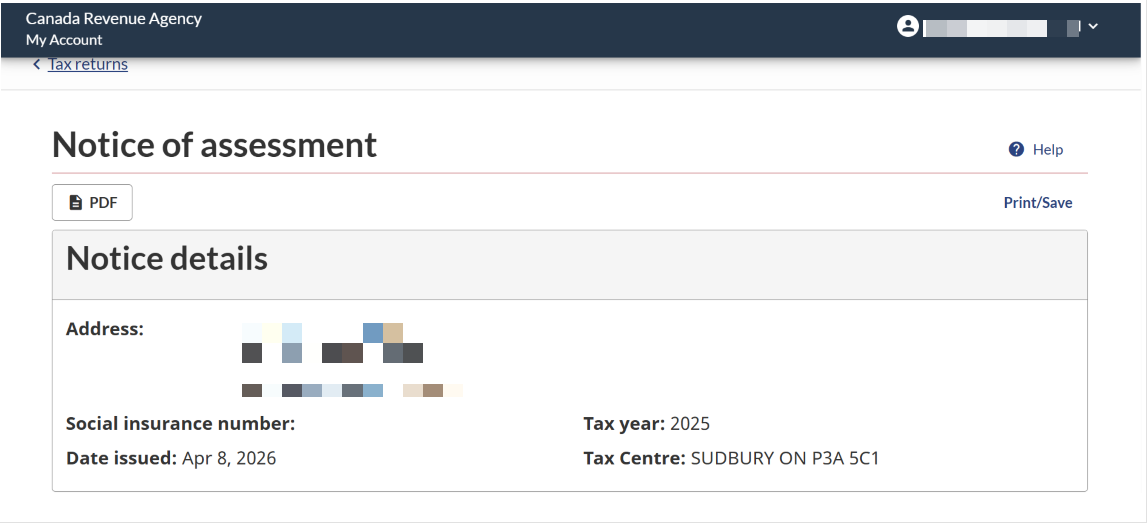
- View the NOA: For the most recent year, click “Notices of Assessment”.
- Save as PDF:
- Click on the “PDF ” button.
- Click the Print icon.
- When the print menu appears, change the “Destination” or “Printer” to “Save as PDF”.
- Save the file to your computer or phone with a clear name (e.g., 2025_NOA_Name.pdf)
Step 2: Upload to MyAccesstoHousingTO
- Log In: Go to MyAccesstoHousingTO and log in with your credentials.
- Click on the Notice of Assessment tab.
- Click Add Notice of Assessment for any household member that is not listed in the table.
- Select “Who does this income belong to”. (Select each applicable name only once.)
- Click Save.
- On the “Documents” tab, for the appropriate household member, click the “Upload/Upload New” button.
- Click Upload:
- Click “Choose File” and select the PDF file you saved from the CRA website
- Click “Open”.
- Click “Upload”.
- Once the document is uploaded, you will be able view the uploaded Notice of Assessment by clicking the “View” button.
Tips
- Check the year: Ensure you are uploading your most recent Notice of Assessment.
- File format: You can upload PDF or JPG formats. PDF is the best choice for clarity.
- File upload: When uploading your NOA in your MyAccesstoHousingTO account, ensure it is in a downloaded PDF format. Images captured with a mobile device will not be accepted.
- Information accuracy: Ensure the uploaded Notice of Assessment has the same information you provided in your MyAccesstoHousingTO account.
- Previous NOAs: All previous Notice of Assessments will be moved to the Archived Documents tab.
Requesting a Notice of Assessment Waiver
You can request a Notice of Assessment Waiver for one year if you meet one of the following criteria:
- You were approved for the Special Priority Program status in the last 12 months
- You were approved for priority status based on currently experiencing homelessness in the last 12 months
- You are a full-time student with proof of enrollment
- You are a newcomer to Canada with less than 12 months in the country
- You just turned 16 years of age, are not a full-time student, and have not yet filed your taxes
- You are a current RGI tenant who is overhoused
Requesting a Notice of Assessment Waiver
- Log into your MyAccesstoHousingTO account
- Click “Continue”
- Navigate to the Notice of Assessment Waiver tab
- Click “Add Notice of Assessment Waiver”
- Under “Member”, select the member of the household for whom you are requesting a waiver
- Under “Would you like to request a Notice of Assessment waiver?”, select Yes
- Under “Please specify a notice of assessment waiver reason”, select the applicable reason
- Click “Save”
Choice-Based Housing Cycle Dates
Applicants at the top of the RGI waiting list based on application date and/or priority status are invited to view vacant units in Choice-Based Housing Cycles. These Cycles run every two weeks.
Choice-Based Cycle Schedule for 2026
| Cycle Name |
Cycle Opening |
Cycle Closing |
| Cycle 1 |
Jan 8 |
Jan 19 |
| Cycle 2 |
Jan 22 |
Feb 2 |
| Cycle 3 |
Feb 5 |
Feb 16 |
| Cycle 4 |
Feb 19 |
Mar 2 |
| Cycle 5 |
Mar 5 |
Mar 16 |
| Cycle 6 |
Mar 19 |
Mar 30 |
| Cycle 7 |
Apr 2 |
Apr 13 |
| Cycle 8 |
Apr 16 |
Apr 27 |
| Cycle 9 |
Apr 30 |
May 11 |
| Cycle 10 |
May 14 |
May 25 |
| Cycle 11 |
May 28 |
Jun 8 |
| Cycle 12 |
Jun 11 |
Jun 22 |
| Cycle 13 |
Jun 25 |
Jul 6 |
| Cycle 14 |
Jul 9 |
Jul 20 |
| Cycle 15 |
Jul 23 |
Aug 3 |
| Cycle 16 |
Aug 6 |
Aug 17 |
| Cycle 17 |
Aug 20 |
Aug 31 |
| Cycle 18 |
Sep 3 |
Sep 14 |
| Cycle 19 |
Sep 17 |
Sep 28 |
| Cycle 20 |
Oct 1 |
Oct 12 |
| Cycle 21 |
Oct 15 |
Oct 26 |
| Cycle 22 |
Oct 29 |
Nov 9 |
| Cycle 23 |
Nov 12 |
Nov 26 |
| Cycle 24 |
Nov 26 |
Dec 7 |
| Cycle 25 |
Dec 10 |
Dec 21 |
Understanding Choice-Based Cycle Summaries
Rent-Geared-to-Income (RGI) housing is offered based on your application date and whether you have priority status. After each Choice-Based Housing Cycle, you will receive a summary showing your ranking for each housing unit you selected. Your ranking may go up or down from one cycle to the next. This is because the group of applicants changes each cycle. The number of applicants and the number with priority status can affect your ranking.
Requesting a Review of an Application Decision
If you disagree with a decision about your application, you can request a decision review. You must submit your request within 30 days of the date shown on the decision notification.
What decisions can be reviewed:
- Eligibility for:
- Rent-Geared-to-Income (RGI) assistance
- Modified unit
- Additional bedroom
- Priority status on the centralized waiting list (Note: Indigenous Priority decision reviews are conducted by a Review Panel consisting of Indigenous Agency Partners.)
- Housing Offer Refusal (Single Offer Rule)
- RGI application date (backdating request)
Requesting a Review
- Log into your MyAccesstoHousingTO account
- Select the “Service Request” button
- Click “Add Service Request”
- Select the request reason by using the drop down menu
- Provide a summary and additional details of why you are requesting a decision review
- Click “Save”
A different City staff member, who was not part of the original decision, will do the review. This is to make sure all rules, laws, and procedures were followed.
To get a copy of the Procedural Rules for Decision Reviews or Indigenous Priority Decision Reviews, email HSS@toronto.ca.
Requesting an Eligibility Review of Indigenous Priority Status
Those who received an eligibility denial decision for Indigenous Priority Status for Rent-Geared-to-Income (RGI) Housing have 30 days to request a review if they disagree with this decision.
Requesting a Review
- Download and complete the Request for Review form
- Log into your MyAccesstoHousingTO account
- Click “Service Request”
- Click “Add Service Request”
- Under the “Request” drop down select “Indigenous Eligibility Review”
- Provide a brief summary and additional details of why you are requesting a review
- Click “Save”
- Upload the form (you will need to save and upload the document)
- Once the form has been uploaded, click “Exit”
Showing Proof of Full-Time Student Status
Full-time students must provide proof of their status as follows:
- For secondary school, one of the following:
- A letter from the principal or registrar
- A certified timetable
- For post-secondary institutions, one of the following:
- A document from a funding agency that outlines the name of the educational institution and the number of courses the student is taking
- Confirmation of enrolment prepared by an educational institution
- A receipt from the educational institution showing the tuition fees paid
How to provide proof of full-time student status
- Log into your MyAccesstoHousingTO account
- Click “Continue”
- On the “Applicant” or “Co-applicant” tab (depending on which household member is a student), in the “Are you a full-time student?” field, select Yes
- On the “Documents” tab, in the “Provide document showing proof of being in full time attendance at school”, click “Upload”
- Click “Choose Files”
- Select a document to upload.
- Click “Open”
- Click “Upload”
Common Concerns
I can’t access my email, what should I do?
If you no longer have access to the email account that you used to create your MyAccesstoHousingTO account, book an appointment and bring government issued photo ID to the Access to Housing Resource Centre at 176 Elm Street or call 416-338-8888.
My legal name changed, what should I do?
If you or a member of your household has had a legal name change, you can update this information in your MyAccesstoHousingTO account online. You will be required to submit supporting documentation of the legal name change with your request. Only update your legal name once you receive your proof of legal name change document, updated status in Canada document and Notice of Assessment with your new legal name.
You can also use a preferred name that is separate from your legal name in your account.
I forgot my password, what should I do?
On your MyAccesstoHousingTO login page:
- Enter your email address and select “Continue.”
- Select the “Forgot Password?” link and follow the instructions to reset your password.
- You will receive the link to reset your password in your inbox.
- Ensure you check your spam/junk folders if you cannot find the email.
If you do not have access to the email address used for your MyAccesstoHousingTO account, you will need to come in-person to the Access to Housing Resource Centre with government-issued photo ID. A staff member will help you to reset your password.
If you are unable to appear in person, contact the Application Support Centre at 416-338-8888.
Date modified: August 7, 2026

